
Cloud PC and Virtual Desktop
Modest hardware at the edge. A protected, managed Windows desktop at the centre.
A Cloud PC is a full Windows 11 desktop that runs in Microsoft's cloud and streams to whatever device your people sign in from. Azure Virtual Desktop does the same on shared hosts. Either way, the work, the files and the security controls stay in one walled environment we manage - not spread across every laptop you own.
Windows 365 and AVD
Both, so the answer fits how you work
Hosted in New Zealand
Microsoft's New Zealand region by default
One standard
The same controls in every location
ISO/IEC 27001:2022
Certified operations
01
The case for change
Every laptop is a full workstation carrying a copy of the business. That is expensive to buy, risky to lose, and hard to secure the same way in every place your people work.
Cost
Each device is specified for the heaviest thing its user might ever do, then replaced every three to four years whether or not the work changed.
Risk
Files, cached email and saved passwords sit on hardware that gets left in taxis, shared at home and kept by people who have since left.
Reach
Staff overseas or in remote sites end up with a weaker setup, because shipping, building and supporting hardware there is slow and expensive.
Hardware cost
When the computing happens in the cloud, the device in front of the user only has to show the desktop and carry the keyboard and mouse. That changes what you need to buy, and how often.
01
An entry-level laptop, a thin client or a web browser is enough. The specification that matters is set in the cloud, not on the purchase order.
02
Laptops too slow for today's software keep working as a window into a Cloud PC, instead of being replaced at year three.
03
The desktop is a fixed monthly cost per user. No capital spike every few years, and no fleet to replace all at once.
04
The analyst or developer who needs 8 or 16 processors gets them in the cloud, without a high-end laptop that sits idle most of the day.
05
Contractors and part-time staff can use their own machines safely, because nothing belonging to the business is stored on them.
06
Lose a laptop and you lose the laptop, not the data. Block the sign-in and the user carries on from another device the same day.
The saving is real but it is not free: the Cloud PC licence replaces part of what you used to spend on hardware. The case is strongest where devices are expensive, lost often, or replaced early.
Distributed teams
Staff overseas, a branch in another city, contractors on another continent. On physical laptops each one is a separate build to ship, secure and support. On Cloud PCs they all sign in to the same managed environment, under the same rules.
Identity
Password and multi-factor authentication through Entra ID, the same in Wellington as in London.
Device
Only approved devices are let in, wherever they happen to be.
Location
Sign-ins are judged on location and risk, and countries you do not operate in can be blocked outright.
Data
Microsoft 365 data can be made reachable from the Cloud PC only, not from the device in front of it.
Build
One standard image and one set of policies, not a different setup for every country or site.
Network
Where it is needed, one fixed outbound IP address shared by every Cloud PC, so firewalls and business applications can allow-list it.
Onboarding
A new starter overseas needs a sign-in, not a laptop built in New Zealand and couriered across the world.
Offboarding
Access ends when the account does. Nothing is left behind on a device you cannot get back.
Cloud PCs are hosted in Microsoft's New Zealand region by default. Where people work a long way from New Zealand, their Cloud PC can sit in a region closer to them for a more responsive desktop, under exactly the same policies.
How it works
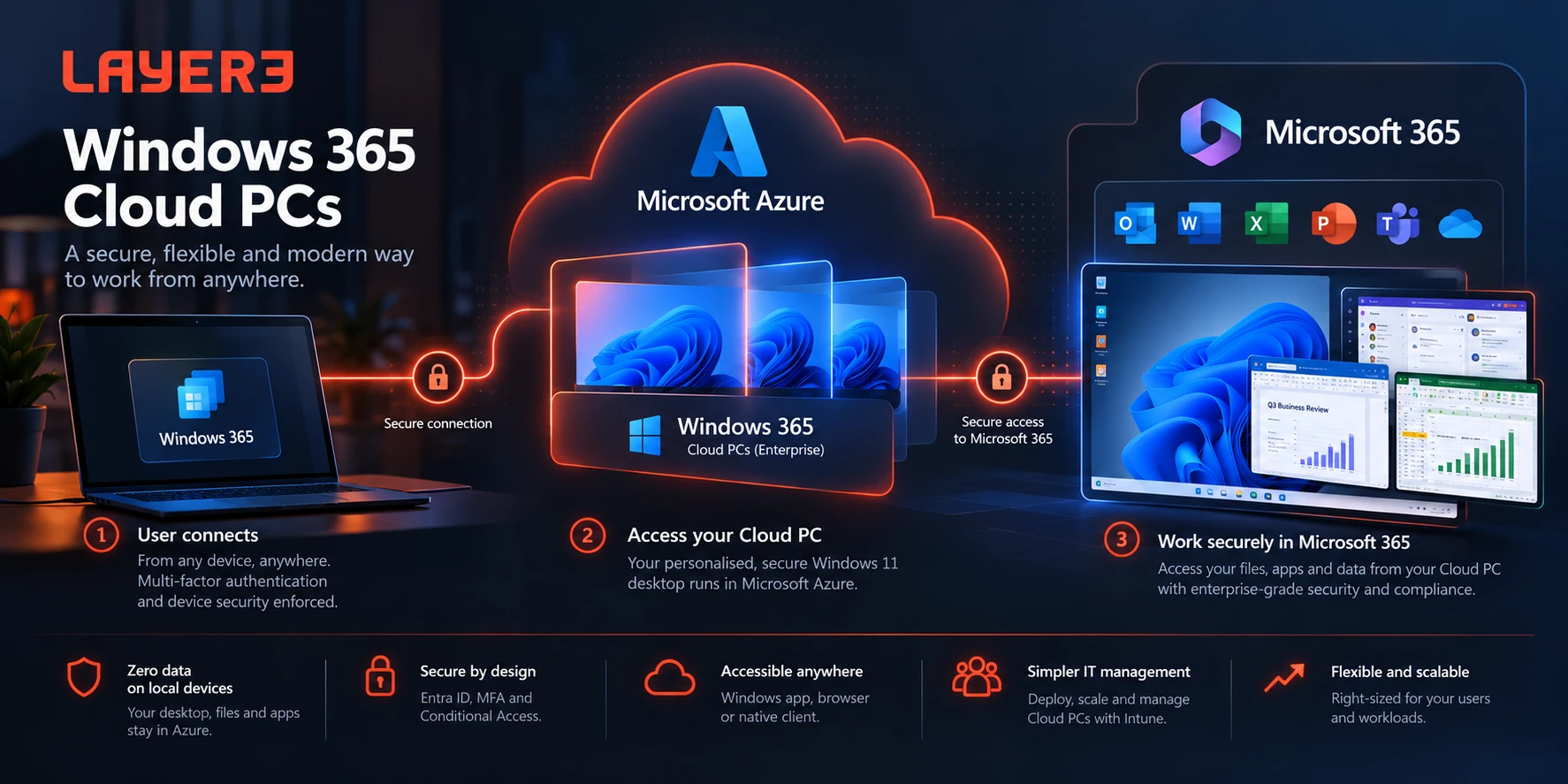
Your people sign in from a laptop, a browser or a thin client and pick up exactly where they left off. Every step between them and your data is checked before anything gets through.
01
The Windows App or a web browser, on a company laptop, a thin client or a home PC. Nothing from the business is stored on it.
02
Password and MFA, an approved device, and a location and risk check, all enforced through Entra ID conditional access.
03
Where the applications run and the files live, isolated from the device and from your office network. Patched, monitored and backed up by Layer3.
04
OneDrive, Outlook, SharePoint and Teams stay where they are today, and answer to the Cloud PC rather than the device.
Block the sign-in and the user carries on from another device. Copying files, the clipboard and printing between the device and the Cloud PC are all controlled by policy, which is what keeps the wall standing in practice rather than only on paper.
Windows 365 or Azure Virtual Desktop
Both put a managed Windows desktop in Microsoft's cloud. A Windows 365 Cloud PC is a fixed licence per person. Azure Virtual Desktop is shared hosts in your own Azure subscription, paid for by the hour. Which comes out ahead depends on how many people you have and how they work.
Question
Points to
Windows 365 Cloud PC
Points to
Azure Virtual Desktop
Does each person need their own desktop, exactly as they left it?
Yes - one personal Cloud PC each
No - people can share hosts
How many people, and what hours do they work?
A smaller team, mostly office hours
Larger groups, shifts or part-time staff
Fixed cost per person, or pay for what is used?
Fixed - the same licence every month
Pay for computing by the hour
Should capacity grow and shrink with demand?
No - each Cloud PC is bought and sized per person
Yes - hosts are added at peaks and shut down overnight
Would you rather not run any infrastructure?
Yes - Microsoft runs the platform
Hosts, profiles and scaling are ours to run in your Azure
A full desktop, or just a few applications?
A full desktop
Either - single applications can be published on their own
Does anyone need serious graphics power?
Graphics sizes exist, priced per person
Graphics hosts, shared and switched off when idle
How soon do you need it running?
Days - provisioned from policy
Weeks - a design phase comes first
What licensing sits on top of Microsoft 365?
A Cloud PC licence for every user
None - Business Premium, E3 or E5 already cover access
There is a crossover point. Windows 365 costs the same per person whether you have ten people or two hundred. Azure Virtual Desktop carries more design and management up front, but its cost per person falls as more people share each host and hosts switch off out of hours. Small teams usually land on Windows 365; larger, shift-based or part-time groups usually land on Azure Virtual Desktop. We work out where your crossover sits from your headcount and working hours before recommending either.
Either one also makes a good isolated workstation for development or other high-risk work - a bad script or a compromised package stays in the cloud, not on your network. How we run Azure
Cloud PC or workstation
A Cloud PC beats a traditional workstation on most of the things that cost money or create risk. It loses on two, and for some roles those two decide it.
Question
Traditional
Workstation
Windows 365
Cloud PC
Where does the work actually run?
On the laptop or desktop in front of the user
In Microsoft's New Zealand region, streamed to any device
How long does a new one take?
Order, ship and build hardware - days or weeks
Provisioned from policy in hours
What happens when it breaks?
Rebuild or replace the device, with data at risk
Roll back to a restore point or reprovision clean
What leaves with a lost or stolen device?
Its files, cached email and saved credentials
Nothing - block the sign-in and carry on
How is it paid for?
Capital up front, refreshed every three to four years
Fixed monthly per user, no refresh cycle
Can the specification change later?
Only by buying a new machine
Yes - moved to a different size, though storage can only grow
Does it work without an internet connection?
Yes - on a plane or a remote site
No - work resumes where it left off on reconnect
Is it suited to heavy graphics - video, CAD, 3D?
Yes, with a local graphics card
Possible, but usually the wrong fit for the cost
Most organisations land mixed: Cloud PCs for the people and places where they earn their keep, ordinary managed laptops for everyone else. Both are run by the same team to the same standard.
Managed, not just licensed
Microsoft supplies the platform. Layer3 supplies the build, the policy and the person whose job it is to keep every Cloud PC healthy.
Build
A standard build with your applications, security baseline and access rules, so a new Cloud PC is ready in hours and identical to the last one.
Run
Enrolled in Intune and managed like any other device. Restore points are taken automatically, so a broken machine rolls back instead of being rebuilt.
Protect
From the Protect plan upward, Cloud PCs sit inside the same 24/7 security monitoring and response as the rest of your managed estate.
Questions
If yours is not here, ask us directly - you will get an engineer, not a form response.
Talk to us about your desktopsA full, personal Windows 11 PC - with its own applications, files and settings - that runs in Microsoft's cloud instead of on the device on your desk. Users sign in from a laptop, a browser or a thin client and pick up exactly where they left off.
Yes, but not expensive ones. The device only needs to run the Windows App or a web browser, so existing laptops last longer and new ones can be bought at the entry level. Thin clients work too.
It moves the cost rather than removing it. You pay a fixed monthly licence per user instead of buying a high-specification device every three to four years. It tends to come out ahead where devices are expensive, lost often, replaced early, or need to be shipped and supported in other countries. We will model it against your actual fleet before you commit.
Business is the simple edition: up to 300 users, networking included, and no policy management or monitoring. Enterprise is managed through Intune like any other device, with conditional access, security baselines, custom builds and a choice of region. Everything this page describes is Enterprise, and it is what we deploy.
Windows 365 Enterprise needs each user licensed for Windows Enterprise, Intune and Entra ID P1. Microsoft 365 Business Premium, E3 or E5 cover all three, so on one of those you only add the Cloud PC licence itself.
Not usually. Cloud PCs on Microsoft's hosted network need no Azure subscription at all - Microsoft runs the network. You need your own Azure subscription only when Cloud PCs must join your own Azure network: to reach on-premises or Azure systems, or to give every Cloud PC one fixed outbound IP address for allow-lists. That adds a small monthly Azure cost for the network gateway.
Cloud PCs are provisioned in Microsoft's New Zealand region by default, with Australia and other regions available. Nothing is stored on the local device. Your Microsoft 365 data stays wherever your tenancy keeps it today.
For most office work, no. For people working a long way from New Zealand, their Cloud PC can be placed in a Microsoft region closer to them, so the desktop stays responsive while the policies, build and support stay exactly the same.
The Cloud PC keeps running, but the user cannot reach it until they reconnect. Nothing is lost - they pick up where they left off. For roles that regularly work offline, a traditional laptop is still the better fit.
As whole-machine restore points, taken automatically through the day plus weekly ones, and a manual point before planned changes. Restoring rolls the entire machine back. Files belong in OneDrive or SharePoint as well, as they would on any device.
It comes down to headcount and hours. Windows 365 gives each person their own desktop for a fixed monthly licence, with nothing to run underneath, and suits most smaller teams. Azure Virtual Desktop shares hosts between people, grows and shrinks with demand and switches off out of hours, and needs no extra licence beyond Business Premium, E3 or E5 - so past a certain size, or with shift and part-time staff, it costs less per person despite the extra management. We support both and will show you where your crossover sits.
Next step
We will tell you whether Cloud PCs suit you, which flavour, and where a normal laptop is still the better answer.

Layer3 is a managed IT provider operating an ISO/IEC 27001-certified ISMS, with offices across New Zealand.
Contact
0508 LAYER3 Book a discovery call Service status Notices
Level 2, CBD Towers
84-90 Main Street
Upper Hutt, Wellington 5018
© 2026 Copyright Layer3.



Layer3
Book a discovery call - 30 minutes, no obligation