Client feedback
97% positive
Across our last 800 client feedback responses.

Managed IT services
Assurance, not assumptions.
Unlimited remote and onsite support, a named security baseline and reporting your board can read - delivered by a New Zealand team certified to ISO/IEC 27001.
Best fit
New Zealand organisations with 10–300 people
Certified
ISO/IEC 27001:2022
Experience
21 years supporting New Zealand organisations
Flexible terms
90-day exit option if the service isn't working for you
Onsite
Unlimited onsite support for in-scope issues. No bank of onsite hours to manage. If an issue genuinely needs someone onsite, we send someone.
Support
Unlimited in-scope support from 8.00 am–5.00 pm, Monday–Friday. Requests can be logged at any time; after-hours support is available and charged separately.
Support vs project
A single in-scope request is covered for up to four hours of effort. Larger pieces of work are scoped separately as projects.
Projects
Migrations, major changes, bulk deployments and remediation are quoted before we start.
Security
Every plan starts from a defined security baseline and maps to an SMB1001 maturity target. 24/7 SOC monitoring starts from Protect.
Co-managed IT
Already have an internal IT team? Layer3 Flex clearly divides responsibilities between your team and ours.
Track record
Layer3 has supported New Zealand organisations since 2005 - including many where trust, privacy and governance are the whole business.
Client feedback
97% positive
Across our last 800 client feedback responses.
The team
20+ Staff
Engineers, analysts and advisers based in New Zealand, not an offshore queue.
Security operations
24/7 SOC
For covered customers: round-the-clock monitoring and response through our managed detection platform.
Independently audited

Layer3 is certified to ISO/IEC 27001:2022, with managed-plan controls aligned to SMB1001 Bronze, Silver and Gold targets.
Customer outcome
50+ to under 10
ECL Group moved from an internal IT function to a fully managed Layer3 service, and its server estate reduced from more than 50 on-premises servers to fewer than 10.
Read the ECL Group case study01
The case for change
Systems appear to work, so harder questions go unasked. Meanwhile the obligations around you have changed – cyber insurance, customer due diligence, privacy expectations and board-level accountability for risk. Managed IT is where those obligations are either met or quietly missed.
Leadership asks
Every plan starts from a named control set, not an opinion. SMB1001 gives you a baseline and a documented position against it.
Finance asks
Managed service pricing is scoped to agreed users, devices and services. Inclusions, exclusions and any variable charges are set out in your proposal and service schedule.
Your people ask
A New Zealand team that knows your environment - remotely within minutes, or at your site when the problem needs someone there. In-scope support is unlimited, so nobody hesitates before calling.
Not sure which
The difference is not size or budget. It is whether you have an internal IT capability worth keeping.
Fully managed
Choose this if you have no internal IT team, or one person stretched across everything. Service desk, endpoints, servers, Microsoft 365, security and strategy are combined in a managed plan, with scope, inclusions and any variable charges documented in your proposal and service schedule.
See fully managed ITCo-managed
Choose this if your IT team is good but stretched, carries too much risk in one person, or never gets to the strategic work. You keep the functions your team does well and assign the rest to us, each with a written scope and a named owner.
See co-managed ITPlenty of organisations start with one and move to the other as the team changes. The split is reviewed on a set cadence, not fixed at signing.
Need a split-responsibility model?
Layer3 Flex assigns a clear owner to every service area, so nothing sits in the gap between your team and ours.
The foundation
Every managed plan includes the operational core below. Higher plans add deeper security, evidence and governance.
01
Unlimited in-scope support, remote or onsite, from a New Zealand team. Log requests any time by phone, email or the Layer3 portal; standard hours are 8.00 am–5.00 pm, Monday–Friday, and we decide whether an issue is best fixed remotely or at your desk.
02
Tenant, licence, identity and policy management, kept aligned to a documented security baseline rather than drifting over time.
03
Device lifecycle, monitoring and configuration across Windows and Apple, with documented workflows for starters and leavers. Patching and routine remediation are automated, covering the operating system and more than 150 third-party applications, driven by over 300 PowerShell modules our engineers maintain in house.
04
Next-generation antivirus, endpoint detection and response, and application control on every managed device, so only approved software runs. Security telemetry is also collected into the SIEM on every plan, with retention increasing by plan.
05
Managed backup for your Microsoft 365 data, with restore testing and retention set to your policy, not a vendor default.
06
DMARC enforcement, so your domain cannot be used to impersonate you against your own customers.
07
Monthly executive reporting on service, posture and progress - written to be read by directors, not decoded by them.
08
A vCIO cadence that turns technical risk into a roadmap, a budget and a board paper. Light at Manage, quarterly at Sentinel.
09
Your plan maps to a named maturity level, so secure stops being a feeling and becomes something you can track and prove.
Support
In-scope support is unlimited - remote, and onsite during business hours. We decide how each issue is best resolved, and if it genuinely needs someone at your site, someone comes to your site.
Included
A user is stuck, a system is down, something is misbehaving. Unlimited, remote or onsite, and never metered.
Included
A mailbox setting, a permission, a software install, a policy adjustment. Routine administration is part of the service.
Scoped as a project
A migration, a fleet refresh, a new site, major remediation. Quoted before we start, so support stays fast and the monthly fee stays predictable.
No support-hour counting
Nothing to count, nothing to bank, nothing to run out of.
We don't ask you to manage an allowance of onsite support hours. If an in-scope issue genuinely needs someone onsite, we send someone onsite.
A single in-scope support request is covered for up to four hours of effort. Larger pieces of work, bulk changes, migrations and planned deployments are scoped separately as projects.
The ladder
Every plan includes the managed IT foundation. Higher plans increase the security coverage, governance and evidence Layer3 provides.
Security starting point
01
We need dependable outsourced IT.
IT managed with a practical security baseline.
Best fit where risk is low and no board or insurer is asking for evidence.
Maturity target: SMB1001 Bronze
Security starting point
02
Our insurer or board expects security evidence.
24/7 security monitoring and analyst response under agreed containment and escalation rules. MXDR and the SOC start with the Protect plan.
Best fit where you carry cyber insurance, answer due-diligence questionnaires or report to a board.
Maturity target: SMB1001 Bronze
Security starting point
03
Our people work across locations, and need secure access from anywhere.
Secure access wherever your people work.
Best fit for hybrid teams, several sites, private cloud or legacy applications.
Maturity target: SMB1001 Silver
Security starting point
04
We carry regulated or material cyber risk.
Mature security governance you can evidence.
Best fit for regulated and higher-risk organisations, and boards that must demonstrate continuous improvement.
Maturity target: SMB1001 Gold
What you pay each month depends on how many people you have, how many sites and devices, and how much security and governance you carry. Discovery produces an itemised service schedule that separates three things: the managed fee, the licensing, and any transition work. You see each of them before anything is signed. How we price sets out the method in full.
Managed service
The monthly fee for the people, monitoring and support in your plan.
Licensing
Microsoft 365, security and backup licences, quoted and itemised separately.
Transition
A one-off onboarding project, scoped and quoted before anything moves.
At a glance
Compare what each plan actually includes. This is a summary; final inclusions are confirmed in your service schedule.
Plan
Capability
Foundation
Manage
Security
Protect
Zero Trust
Secure Edge
Governance
Sentinel
In-scope support is unlimited on every plan - remote, and onsite during business hours. A single request is covered for up to four hours of effort; larger planned work is scoped as a project.
●
●
●
●
A detection and response agent on every managed device, on every plan. It watches how processes, files and network connections behave rather than matching known signatures, and records what happened for investigation.
●
●
●
●
Security telemetry from endpoints, identity, email and network is collected into a SIEM on every plan, and kept for investigation and evidence. Longer retention supports deeper investigation and compliance obligations.
30 days
30 days
90 days
1 year
A 24/7 security operations centre with human analysts, correlating endpoint, identity, email and network signal (MXDR), with automated containment. Starts at the Protect plan.
—
●
●
●
Ongoing security awareness training and simulated phishing, so your people learn to recognise and report what filters miss.
—
●
●
●
Only approved software runs on managed devices. Application control blocks unknown and malicious software before it can start, and is included on every plan.
●
●
●
●
Zero Trust network access built on SASE: private application access, site-to-site connectivity and traffic inspection wherever your people work.
—
◇
●
●
Structured reviews with Layer3 to assess performance, risk, priorities and upcoming technology needs, giving management a clearer view of where IT is today and what should happen next.
Annual overview
Annual
Twice yearly
Quarterly
A formal governance, risk and compliance programme: policies, controls, a maintained risk register and evidence, reviewed on a set cadence.
—
—
—
●
The SMB1001 maturity level your plan is designed to reach and maintain - a named, certifiable security posture rather than a feeling.
Bronze
Bronze
Silver
Gold
● included · ◇ optional · — not included. Where a figure is shown, it is that plan's actual cadence or retention.
Every plan's SMB1001 maturity target is explained below. Plan inclusions are subject to agreed scope, minimum requirements and the final service schedule.
We'll map your current environment and obligations to a starting point.
The platform
Managed IT is only worth what you can see of it. These are the four views every plan puts in front of you: the service desk, your Microsoft 365 posture, your roadmap, and the security operations behind them.
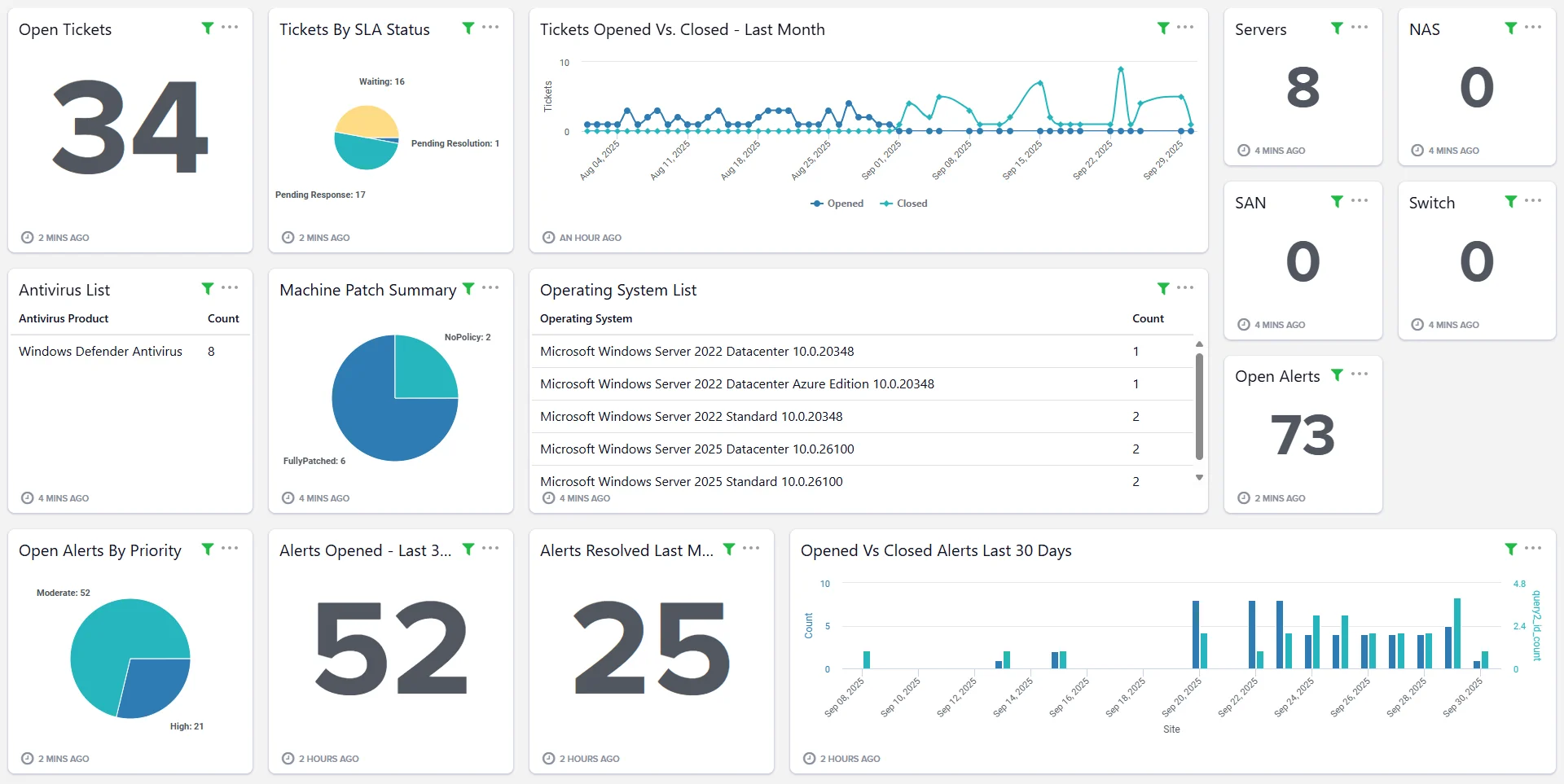
01 Visibility
From service desk tickets to system health, our platform tracks performance, response times and service levels in real time. Disk encryption, patch status, warranty and asset age are polled continuously across every device - so posture is verified rather than presumed, and hardware is replaced on evidence rather than after it fails.
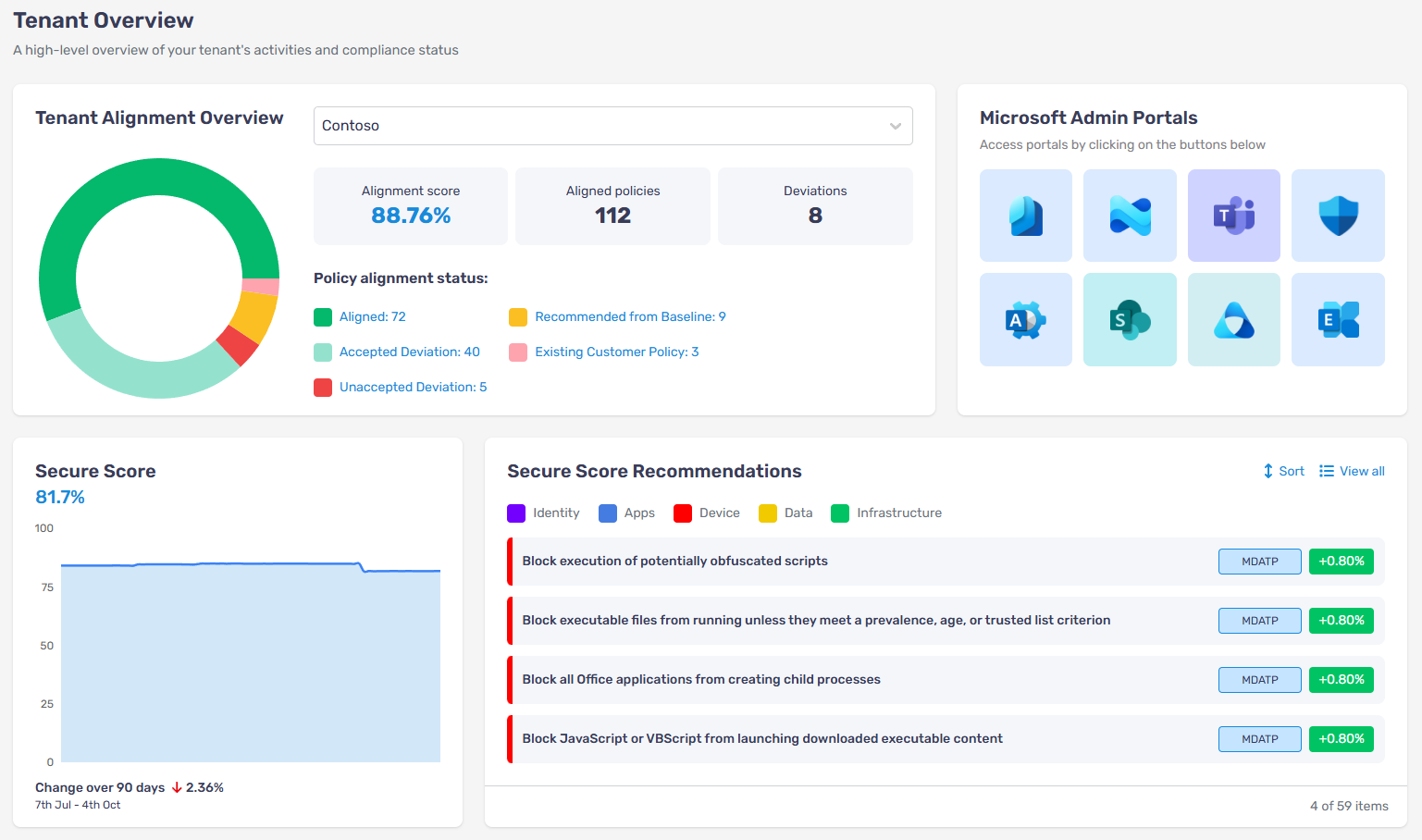
02 Compliance
We keep your Microsoft 365 environment aligned to best practice through regular reviews and automated policy checks, identifying gaps and holding consistency across users, devices and data. You get clear visibility of alignment status, secure score trends and remediation priorities.
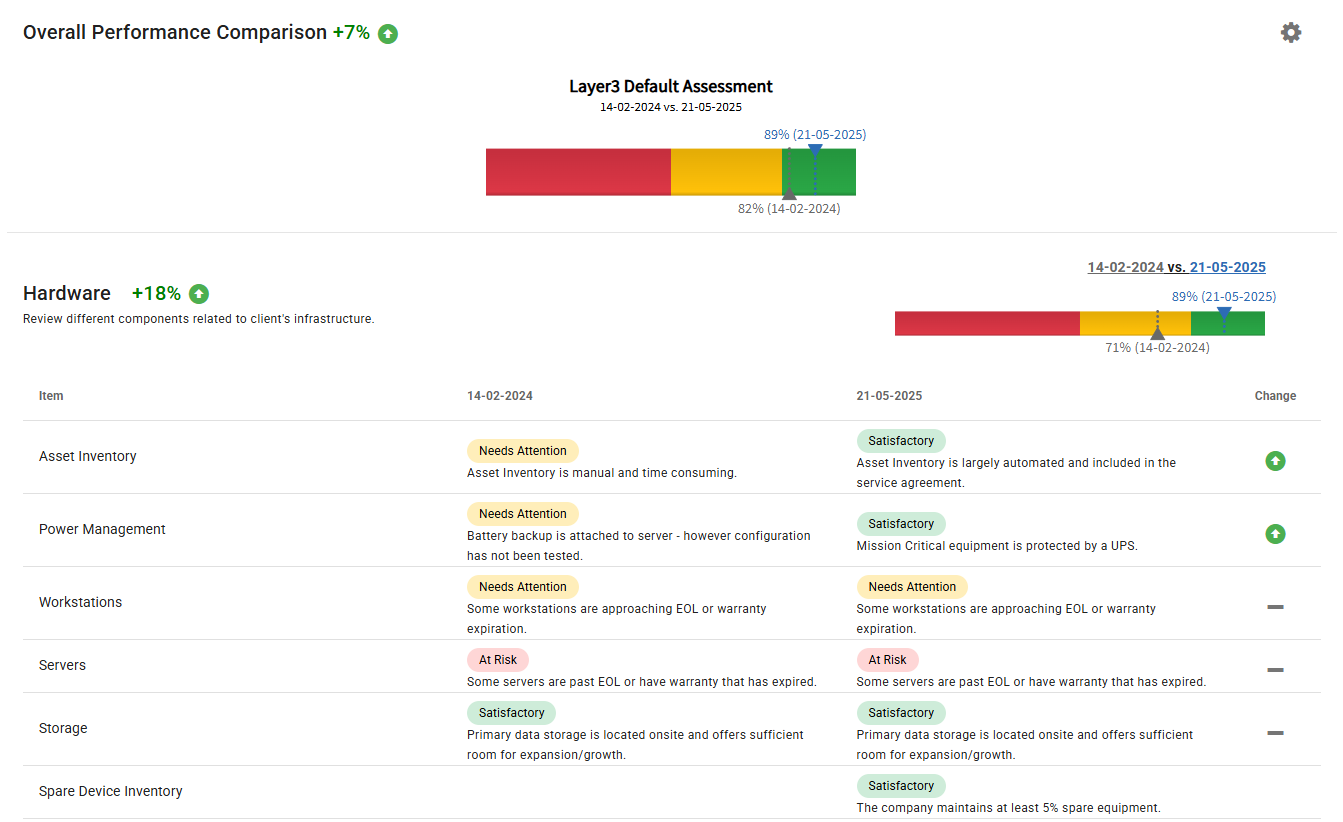
03 Strategy
That might mean helping leadership shape an AI policy, translating technical risk into language the board can act on, or using Microsoft 365 data to uncover productivity trends and cost savings. We build a roadmap and review it on the cadence your plan sets - annual at Protect, quarterly at Sentinel.
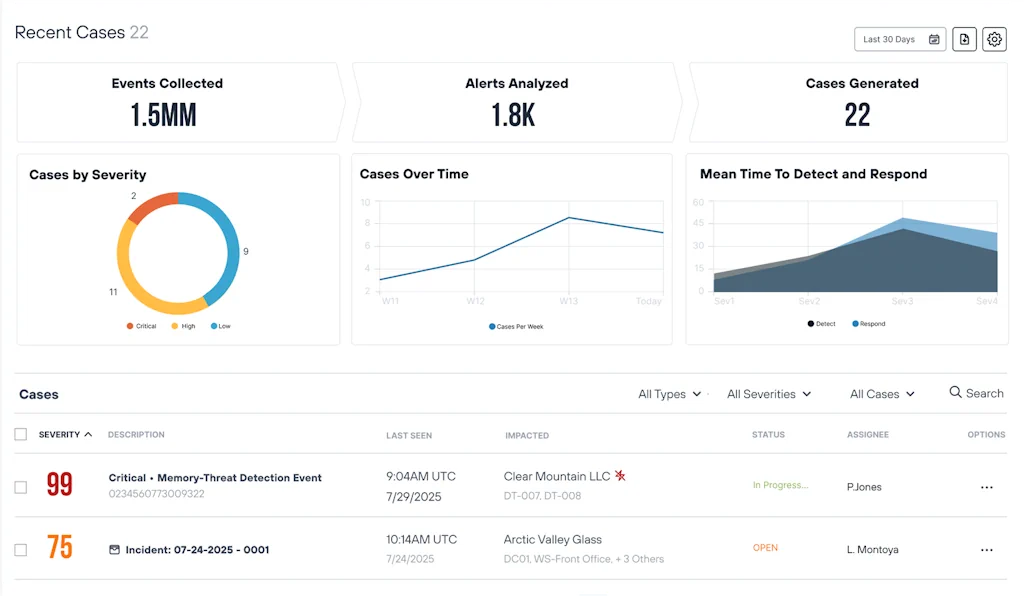
04 Security operations
Behind the MXDR platform sits security orchestration and automated response, so containment does not wait for someone to read an alert. Email, identity and remote access are secured with intelligent filtering, DMARC enforcement, phishing protection and Zero Trust network access built on SASE principles.
Commercial terms
Your monthly fee is scoped to agreed users, devices and services. Here are the main items that sit outside it. We would rather you read them here than find them in month three.
Transition and onboarding
Moving to Layer3 is run as a project and quoted before anything moves. The project fee is typically about one month's service fee, and onboarding is discounted 25% on a two-year term and 50% on a three-year term. Onboarding is 100% off for organisations switching from another IT provider - see switching to Layer3.
Project work
Migrations, upgrades, office moves and new systems are scoped and quoted separately from the managed fee. The working boundary: a single in-scope support request is covered for up to four hours of effort; larger pieces of work, bulk changes, migrations and planned deployments are scoped as projects.
After-hours support
The service desk runs 8.00 am–5.00 pm, Monday–Friday. Requests can be lodged at any time, but work carried out outside those hours is charged separately. The security operations centre runs 24/7 from Protect upward.
Licensing
Microsoft 365, security and backup licensing is quoted separately from the managed fee and itemised in your proposal, so you can see what the software costs and what the service costs.
Travel beyond your agreed sites
Onsite support at your agreed sites is part of your plan, uncounted. Unusual travel - regional visits outside the agreed service area, flights, accommodation - carries direct costs, agreed with you before anyone travels.
Major incident recovery
Our SOC detects, investigates and coordinates response around the clock from the Protect plan. If an incident develops into a major recovery or forensic engagement - ransomware recovery, rebuilding systems, large-scale remediation - that work is scoped separately, with you and, where appropriate, your cyber insurer.
Term, and how you leave
The term
Managed agreements run on a fixed term, agreed before you sign. A longer term buys a lower onboarding cost, not a different standard of service.
What a longer term is worth
Onboarding is discounted 25% on a two-year term and 50% on a three-year term. Onboarding is 100% off for organisations switching from another IT provider - see switching to Layer3.
The 90-day exit clause
Every managed agreement includes a 90-day exit clause. If the service is not what we said it would be, the term does not hold you to it.
Nothing arrives unannounced
You get a final service schedule and pricing at the end of discovery, before the first change is made. Inclusions, exclusions and any variable charges are named in it.
We do not publish a rate card, because the monthly figure depends on how many people you have, how many sites and devices, and how much security and governance you carry - and a number that ignores all of that is a number you would have to renegotiate. What we will do is name every charge that sits outside it, which is usually the part that goes unsaid.
Transition
A structured handover led by a dedicated project manager and a senior engineer, planned around the path of least disruption to your people. Your current provider's tooling is removed only once ours is verified, so there is no gap in cover at any point.
01
Weeks 1–2
We audit users, devices, sites, systems, licences and contracts, and validate what you have against what you are paying for. You get a final service schedule and pricing before anything moves. Anything discovery identifies that needs remediation is discussed and quoted separately before work begins.
02
Weeks 2–3
A shared plan with milestones and named owners on both sides. Notice periods, data ownership, administrator credentials and licence transfers are mapped before the first change is made.
03
Weeks 3–6
Documentation and asset data first, then monitoring and patching, then the security stack. Each layer is verified live before your previous provider's agents are removed.
04
Weeks 6–8
Microsoft 365 hardened to the agreed baseline, backups verified with a test restore, and your first posture report issued against the SMB1001 level your plan targets.
05
Ongoing
Reporting and scheduled reviews keep the service, and your security maturity, moving with the business rather than drifting behind it.
Timings are indicative for a typical mid-sized environment and are confirmed in your transition plan. Transition is run as a project and quoted before anything moves; onboarding is discounted 25% on a two-year term and 50% on a three-year term. Onboarding is 100% off for organisations switching from another IT provider - see switching to Layer3. Managed agreements include a 90-day exit option if the service is not working for you.
See what the move would actually involve for your organisation - the sequence, the timing, and what it costs before anything moves.
Managed IT in practice
ECL Group had around 300 users and an internal IT function when it moved to a fully managed Layer3 service. The transition included moving its server estate from on-premises infrastructure into the Layer3 cloud.
Starting point
Around 300 users, an internal IT function and more than 50 on-premises servers.
Service model
ECL moved from internal IT to a fully managed Layer3 service.
Cloud migration
Layer3 migrated the server estate from on-premises infrastructure into the Layer3 cloud.
Outcome
The server footprint reduced from more than 50 servers to fewer than 10, simplifying the environment Layer3 operates and supports.
Start the conversation
We'll establish whether fully managed or co-managed IT fits, your likely service level, and the information we need to prepare indicative scope and pricing. No obligation and no sales deck.
30 minutes
One conversation, not a sequence of qualifying calls.
One of our senior advisers
Someone who can scope the work, and no preparation required from you.
Service details
Everything below is reference material: how support is delivered and measured, how security operations work, and the certification standard behind the plans. You do not need it to decide - it is here so you can check.
Security operations
MDR watches the endpoint. MXDR also correlates identity, email and network telemetry, helping analysts detect activity that never reaches an endpoint agent.
The common approach
Agent telemetry from laptops and servers, triaged against endpoint alerts. Genuine coverage - but only of the ground an endpoint agent can see.
What Layer3 includes
Endpoint, identity, email and network signal correlated in one platform, with automated containment and human analysts hunting around the clock. Delivered through our security platform.
Endpoint
Identity
Email and SaaS
Network and cloud
Human risk
Included from Protect upward. Not an add-on, not a premium tier.
Service levels
Requests can be lodged at any time by phone, email or the Layer3 portal. Standard service desk hours are 8.00 am–5.00 pm, Monday–Friday, excluding public holidays. Response means acknowledgement of the request; resolution means a fix, workaround or completion.
Priority 1 · Critical
Material adverse impact. Response within 15 minutes; resolution within 4 business hours of response; progress updates every hour.
Priority 2 · Major
Moderate adverse impact. Response within 30 minutes; resolution within 6 business hours of response; progress updates every 2 hours.
Priority 3 · Medium
Low adverse impact. Response within 1 hour; resolution within 8 business hours of response.
Priority 4 · Minor or request
Little or no operational impact. No response target; resolution within 16 business hours.
Priority 1
Response within 1 hour; resolution within 8 hours of response.
Priority 2
Response within 2 hours; resolution within 16 hours of response.
Priority 3
Response within 2 hours; no after-hours resolution target.
Priority 4
No after-hours response or resolution target.
After-hours support is available to customers and charged separately. Change requests target completion within 5 business days, or as otherwise agreed, and have no after-hours target. Priority is determined by Layer3, acting reasonably. Final targets and definitions are confirmed in your service schedule.
The standard
Every Layer3 managed plan is aligned to SMB1001, the tiered cyber security standard for small and mid-sized organisations. Alignment is included inside every plan - it is part of how we deliver managed IT, not a separate project.
The baseline of care. Reached with Manage and Protect - essential controls in place and maintained.
Documented controls and governance. Reached with Secure Edge – the level agreed for your organisation.
Mature, evidenced security management. Reached with Sentinel - defensible at board and audit level.
Because Layer3 is certified to ISO/IEC 27001:2022, the provider holding your data is audited to the same discipline we ask of you.
Common questions
The questions we get asked most often about managed IT, plans and support. If yours is not here, ask us directly.
Book a discovery callFull-service IT support: remote helpdesk, onsite assistance, server and infrastructure support, Microsoft 365 administration, endpoint management and proactive monitoring. Every plan carries the same operational core - what changes as you move up the ladder is how much of your security risk we take on.
It depends on how many people you have, how many sites and devices you run, and how much security and governance you need, so we scope it rather than publish a rate card. The shape of it is the same for everyone: one monthly fee for the plan you choose, a transition project fee that is typically about one month's service fee, and a short list of charges that sit outside the monthly figure. All of it is confirmed in your proposal and service schedule before you sign.
Six things: the transition project, project work such as migrations and upgrades, after-hours support, Microsoft 365 and third-party licensing, travel beyond your agreed sites, and major incident recovery. Each one is named in your proposal and service schedule rather than discovered later.
Support is fixing things and making small changes: someone cannot work, something is misbehaving, a setting needs adjusting. A project is planned work: a migration, a bulk deployment, an infrastructure change, major remediation, or any single piece of work beyond about four hours of effort. Projects are quoted before we start, so support stays fast and your monthly fee stays predictable.
Managed agreements run on a fixed term agreed before you sign. A longer term buys a lower onboarding cost rather than a different standard of service: onboarding is discounted 25% on a two-year term and 50% on a three-year term. Onboarding is 100% off for organisations switching from another IT provider - see switching to Layer3. Every managed agreement also includes a 90-day exit clause, so if the service is not what we said it would be, the term does not hold you to it.
Standard service desk hours are 8.00 am–5.00 pm, Monday–Friday. Requests can be lodged at any time; after-hours support is available to customers and charged separately. The security operations centre operates 24/7 for customers whose plan includes it. Priority targets and escalation arrangements are defined in your service schedule.
By phone, email, or through our support portal. Clients also benefit from our remote monitoring, which often alerts us to issues before you notice them.
We support organisations across New Zealand. Our teams are based in Wellington and Auckland, with remote coverage nationwide and satellite offices for regional response.
Yes. We support macOS devices, especially in hybrid environments, including updates, security and integration with Microsoft 365. Apple devices need to be registered in Apple Business Manager.
Yes. We often partner with internal teams to provide overflow support, specialist skills or strategic oversight through our vCIO service.
We send someone. In-scope onsite support during business hours is part of the service on every plan - there is no bank of onsite hours, no call-out fee and no per-visit charge. We decide whether an issue is best fixed remotely or at your site. Travel beyond your agreed sites is the only extra that can arise, and it is agreed before anyone travels.
From the Protect plan, our SOC detects, investigates and coordinates response around the clock. If an incident develops into a major recovery or forensic engagement - ransomware recovery, rebuilding systems, large-scale remediation - we scope that work separately and work with you and, where appropriate, your cyber insurer.
It depends on what you have to answer for. Manage suits low-risk organisations with no board or insurer asking for evidence. If you carry cyber insurance, answer due-diligence questionnaires or report to a board, Protect is the practical starting point. Secure Edge adds secure access for hybrid and multi-site work, and Sentinel adds evidenced security governance.
Included. Each managed plan maps to an SMB1001 target level — Bronze for Manage and Protect, Silver for Secure Edge, Gold for Sentinel. All three are certified on a director’s attestation with the certificate issued by CyberCert, so none of them needs an external audit — SMB1001 only requires that at Platinum and Diamond, which Layer3 does not offer. The CyberCert subscription and the certification cost sit inside your plan fee, along with the work of meeting the applicable controls, and your target level, responsibilities and evidence requirements are confirmed in your proposal and service schedule.

Layer3 is a managed IT provider operating an ISO/IEC 27001-certified ISMS, with offices across New Zealand.
Contact
0508 LAYER3 Book a discovery call Service status Notices
Level 2, CBD Towers
84-90 Main Street
Upper Hutt, Wellington 5018
© 2026 Copyright Layer3.


Layer3
Book a discovery call - 30 minutes, no obligation