Microsoft Copilot Cowork: AI moves from “help me” to “do this”
Microsoft’s new Copilot Cowork is one of the more important changes to Microsoft 365 Copilot so far. Standard Copilot helps users draft, summarise, search and analyse.
AI, News
Microsoft’s new Copilot Cowork is one of the more important changes to Microsoft 365 Copilot so far. Standard Copilot helps users draft, summarise, search and analyse. Cowork goes a step further: it is designed to take a whole business outcome, plan the work, use multiple Microsoft 365 tools, and return a finished result. Microsoft made Copilot Cowork generally available worldwide on 16 June 2026, after a Frontier preview where Microsoft says more than half of the Fortune 500 had used it.
That distinction matters. This is not just another chat window. Microsoft’s own documentation says Cowork can send emails, schedule meetings, create Word, Excel, PowerPoint and PDF outputs, post in Teams, search company resources and manage calendar activity, with user approval before actions happen. In practical terms, a user could ask it to prepare a sales follow-up pack, build a project status report, analyse a folder of documents, create a draft client deck, or organise meetings and actions from a messy email thread.
The best way to think about it is this: Copilot is the assistant you prompt. Cowork is the agent you delegate to.
Where Cowork fits against Microsoft 365 Copilot
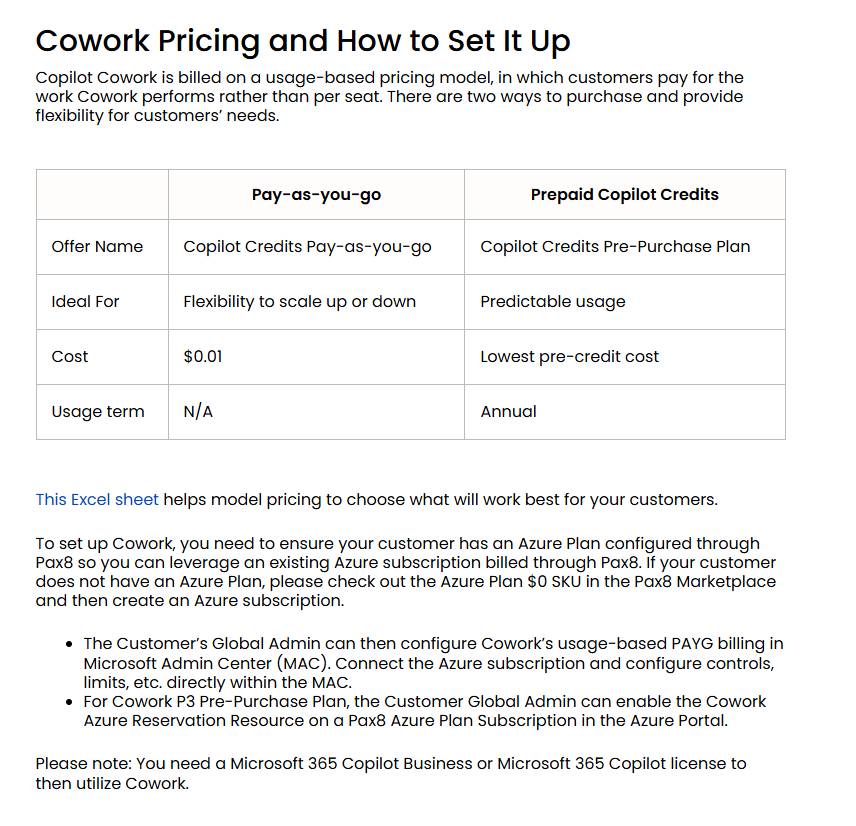
Cowork does not replace Microsoft 365 Copilot. It sits on top of it. Microsoft says Cowork requires a Microsoft 365 Copilot user subscription licence, and Cowork usage is then billed separately on a consumption basis using Copilot Credits. The task cost is calculated from four inputs: model use, context retrieval, tool calls and runtime.
That makes the product positioning fairly clear:
Tool
Best use
Strength
Weakness
Microsoft 365 Copilot Chat / app Copilot
Quick answers, document drafting, Teams recaps, email summaries, spreadsheet help
Predictable per-user licensing, native in Microsoft 365, strong for daily productivity
Still mostly prompt-by-prompt. The user drives the workflow
Copilot Cowork
Delegated, multi-step work across Outlook, Teams, Word, Excel, PowerPoint, SharePoint and calendar
Variable cost, needs good governance, not all controls and connectors are mature yet
Copilot Studio
Building internal or external agents
Flexible agent builder, Power Platform connectors, can publish beyond Microsoft 365
More design, testing and governance work required. Licensing is another layer
Agent 365 / governance layer
Managing agents at scale
Useful control plane for agent sprawl
Still a broader governance story, not a user-facing productivity tool
The headline is that Cowork is most compelling when work crosses multiple Microsoft 365 apps. Standard Copilot is still the better fit for “summarise this document”, “rewrite this email”, or “make this spreadsheet easier to understand”. Cowork is for “prepare the client renewal pack, check the last six months of emails and meetings, draft the proposal, build the slide deck and identify follow-up actions”.
How it compares with other AI tools
The market is moving quickly, but Cowork has a real advantage for organisations already standardised on Microsoft 365.
Against Claude Cowork: Claude Cowork is probably the closest conceptual competitor. Anthropic describes Claude Cowork as an agentic workspace that uses the same architecture as Claude Code, but aimed at knowledge work rather than coding. It can work with local files, coordinate sub-agents and create polished deliverables such as spreadsheets, presentations and formatted documents. Anthropic also says Claude Cowork is built around outcomes, not individual prompts, and runs on the desktop across local files and applications.
Claude’s strength is its flexibility on a user’s desktop, especially for file-heavy research, writing and analysis. Its weakness, for a Microsoft 365 tenant, is that it is not native to Microsoft 365 governance in the same way. Claude’s Microsoft 365 connector can access Outlook, OneDrive, SharePoint and Teams through an Entra-registered connector, but the remote connector sends data in transit through Anthropic’s US-based infrastructure, while the local connector keeps Microsoft 365 traffic between the device and Microsoft. That may be acceptable for some organisations, but it is a governance and data-residency discussion, not just a feature comparison.
Against ChatGPT Enterprise and Business: ChatGPT remains a very strong general-purpose AI platform. OpenAI’s business materials position ChatGPT Enterprise around models, agents, deep research, coding and company-data connections including Microsoft SharePoint, GitHub and Google Drive. OpenAI also now has workspace agents that can be created, shared, scheduled, triggered through an API and connected to tools, apps, skills and files.
ChatGPT’s advantage is breadth. It is often excellent for analysis, content, coding, research and custom agent workflows across mixed SaaS estates. Its disadvantage versus Cowork is native Microsoft 365 execution. It can connect to Microsoft data, but it does not live inside the Microsoft 365 trust, compliance and admin experience in the same way Cowork does.
Against Google Gemini for Workspace and Gemini Enterprise: Gemini is the obvious choice for Google Workspace businesses. Google positions Gemini in Workspace as secure AI assistance built into Gmail, Docs, Sheets, Meet, Drive and NotebookLM, with company data not used to train models. Google’s Gemini Enterprise app is now positioned as an agentic platform that can securely connect to Microsoft 365, Google Workspace and more, and automate multi-step, multi-app workflows.
Gemini’s strength is Google-native productivity and search. For Microsoft 365 tenants, it is more likely to be a cross-platform AI layer than the default operating model. Cowork has the home-ground advantage where the client’s email, meetings, files, identity and compliance already sit in Microsoft 365.
The right comparison is not “which AI is best overall?” It is “where does the work live?” If the work lives in Microsoft 365, Cowork is a natural fit. If the work lives in Google Workspace, or other platforms, those native agents may be better.
Pros of Copilot Cowork
1. It is native to Microsoft 365. Cowork works where many businesses already live: Outlook, Teams, SharePoint, OneDrive, Word, Excel, PowerPoint and calendar. That reduces user friction and avoids forcing people into a separate AI workspace.
2. It moves from chat to execution. This is the key difference. Cowork is built for complex, long-running, multi-tool tasks. Microsoft says it is designed to return a completed result rather than just a draft or recommendation.
3. It has enterprise controls. Microsoft says Cowork is off by default, admins decide who gets access, and spending limits can be set at tenant, group and user levels. Admins also get usage reporting by tenant, group, user and feature.
4. The multi-model direction is sensible. At general availability, Microsoft says Cowork runs on Anthropic models including Opus 4.8 and Sonnet 4.6. GPT 5.5 is available in Frontier, and Microsoft’s Cowork 1 model is coming soon for lower-cost everyday tasks. This matters because not every task needs the most expensive frontier model.
5. It could be cheaper than using third-party agents for Microsoft 365 work. Microsoft claims its internal June 2026 testing found Copilot Cowork was on average 30 to 40 percent cheaper than Claude Cowork with a Microsoft 365 connector, using comparable Opus 4.8 test runs. Treat that as a vendor benchmark, not an independent market test, but it is still a useful signal.
Cons and risks
1. The pricing is variable. Cowork is not “all you can eat”. Long-running agentic work can create material compute cost, and Microsoft is explicit that usage-based billing is central to the model. This is manageable, but only with controls.
2. SharePoint and permissions hygiene become more important. Cowork can only work safely if the underlying access model is clean. If a tenant has years of over-shared SharePoint sites, broken inheritance and unmanaged guest access, Cowork may surface or act on data the user technically has access to, even if the business did not intend it. We will run a Copilot readiness check to ensure that permissions are correct before deployment.
3. It adds another licensing conversation. You need the Microsoft 365 Copilot licence first, then Cowork usage is billed separately. Microsoft’s US list price page shows Microsoft 365 Copilot at US$30 per user per month, paid yearly (NZD pricing not confirmed).
4. Some governance is still evolving. Copilot Cowork has become generally available from June 16th. However, Microsoft lists several security and compliance controls, but also notes that Data Loss Prevention for Cowork is coming soon. For regulated clients, that detail matters.
5. It still needs human judgement. Cowork can assemble, draft, compare, schedule and propose. It should not be trusted to make commercial, legal, security or HR decisions without review.
The AI credit system, explained
Microsoft is moving toward a more consumption-based model for agentic AI. For Cowork, the currency is Copilot Credits. A Cowork task consumes credits based on the AI model used, the amount of organisational context retrieved, the number of tools or skills called, and how long the task runs.
Microsoft’s cost controls are built around three ideas:
Control: admins choose whether Cowork is enabled, who can use it, and how much can be spent. Spending limits can be applied at tenant, group and user levels.
Visibility: admins can see consumption by user, group and feature, with user-level task pricing in credits coming after general availability.
Efficiency: customers can use PayGo or P3. PayGo is priced at US$0.01 per Copilot Credit, while P3 lets organisations pre-commit to usage for a discount. Microsoft’s Azure documentation says Copilot Credit pre-purchase plans run for one year and automatically use prepaid commit units against eligible Copilot Credit usage.
This credit model also appears across Copilot Studio. Microsoft says Copilot Studio capacity packs include 25,000 Copilot Credits for US$200 per pack per month, with pay-as-you-go and pre-purchase options also available.
One important clarification: Microsoft also uses the term AI credits in consumer and some Microsoft 365 subscription contexts. Those credits measure AI feature usage in Microsoft 365 and Windows apps, where actions such as generating text, creating a table or editing an image consume credits. For Copilot Cowork, the enterprise discussion is specifically about Copilot Credits and usage-based billing.
Verdict
Copilot Cowork is most attractive for organisations that are already deep in Microsoft 365 and have repeatable, cross-app knowledge work: sales operations, project management, finance packs, account reviews, service delivery reporting, HR onboarding, meeting follow-up and document-heavy client work.
It is less attractive for organisations that only want cheap chat, have poor Microsoft 365 governance, or are not ready to manage consumption costs. For those customers, standard Microsoft 365 Copilot, ChatGPT Business, Claude, Gemini, or a domain-specific agent platform may be a better first step.
The sensible rollout is not tenant-wide enablement on day one. Start with a controlled pilot. Pick two or three high-value workflows, clean the permissions around the data they need, set user and group credit caps, measure time saved, and review outputs closely. Cowork is promising, but the organisations that get value from it will be the ones that treat it like a delegated digital worker, not a magic button.