
AI governance
AI protection that runs on every work device, 24/7.
Staff already use ChatGPT, Copilot, Claude and tools nobody approved. This is not a report on what they did last month. An agent runs on every work device around the clock, checks each AI app, prompt, paste and upload against your rules, and stops what breaks them as it happens. Think of it as an approved list for AI: the tools you have said yes to work as normal, and anything not on the list is stopped or questioned before staff can use it. Run by the team that already manages your environment.
Established
Since 2005
Certified
ISO/IEC 27001:2022
Covers
Browser and desktop AI apps
Enforced
On the device, 24 hours a day
Always on
The agent on each work device enforces your rules in real time: it allows the approved tools, questions the unknown ones, blocks the risky ones and strips sensitive data out of a prompt before it is sent. This is the view our team works from. We watch it, tune the rules and bring you the decisions that need you.
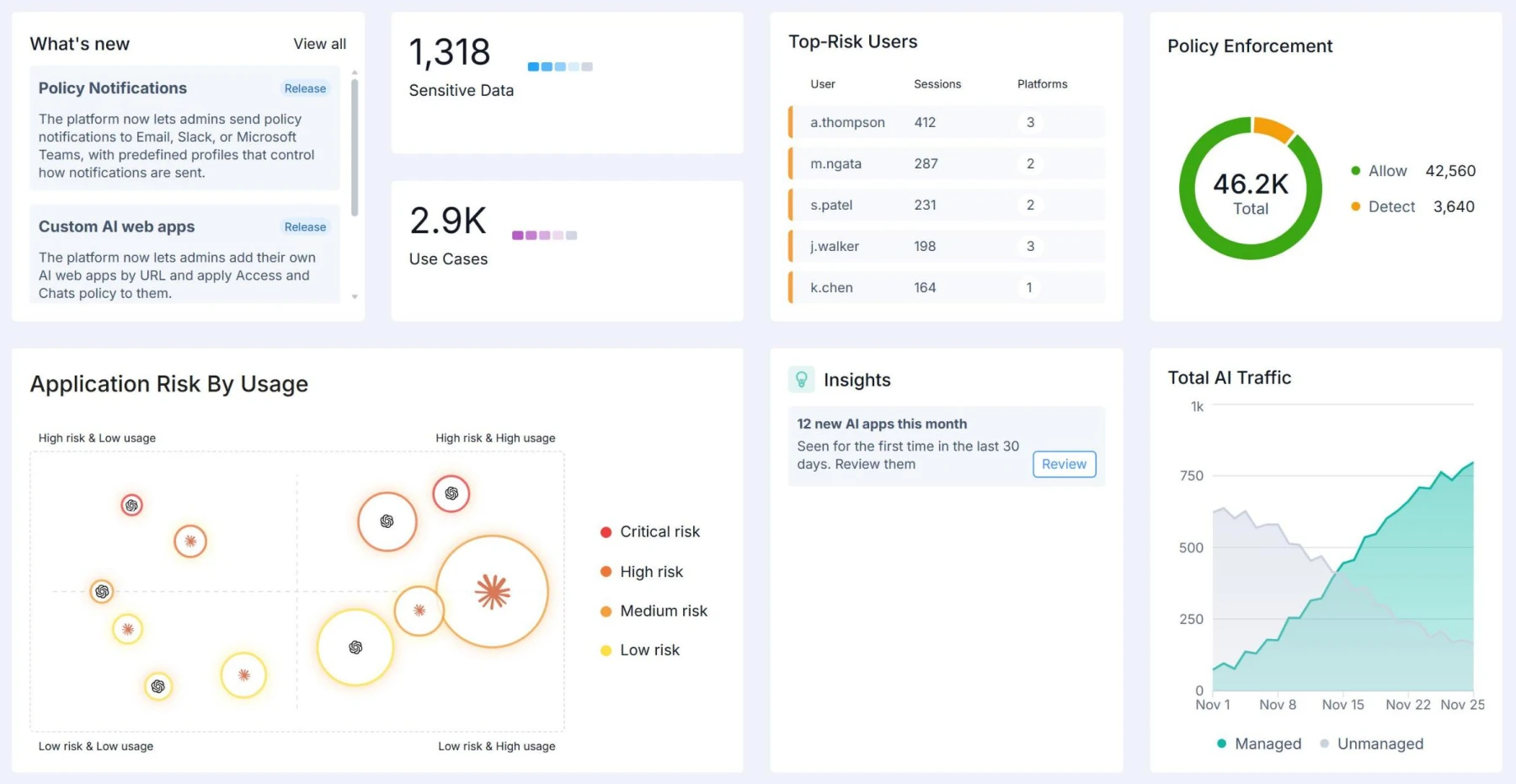
01
The problem
Blocking it outright does not work. Staff move to a phone or a personal account, and you lose sight of it entirely.
Shadow AI
Staff sign up to AI tools with a work email or a personal one. There is no list of what is in use, so there is nothing to assess.
Data in prompts
A contract, a payroll export or a customer list goes into a prompt to save ten minutes. Once it is sent, you cannot get it back.
No evidence
Most organisations have an AI use policy or are writing one. Without a record of what actually happens, it is a document, not a control.
What you get
Nine things, delivered as one managed service. The first seven are enforced on the device. The last two are how you see it working.
01
An inventory of the AI in use: web apps, browser extensions, desktop apps, developer tools and agents.
02
Each AI app rated for risk, so the decision to approve it rests on more than its popularity.
03
Allow, ask or block, set per app and per user or group. Approved tools stay open. The rest are closed or questioned.
04
Prompts, pasted text and file uploads checked for sensitive data before they are sent.
05
Sensitive details removed from a prompt in place, so the work carries on without the data.
06
Where a rule is set to ask, staff see why and confirm before they continue. The habit is corrected at the moment it happens.
07
AI agents and the MCP tools they can reach are inventoried and controlled, not only chat windows.
08
Scheduled reports and an event log of AI use, in a form a board or an auditor can read.
09
A written AI use policy that matches the rules actually enforced, brought to your regular plan review.
How it works
Discovery comes first. Rules written before you know what is in use block the wrong things.
01
The agent and browser extension go out through your device management and watch for a few weeks before any rule is switched on. That gives a baseline of the AI in use and who uses it.
02
We go through the list with you: which tools are approved, for whom, and what data must never go into any of them.
03
The decisions become rules, enforced by the agent on each device as it happens. Approved tools stay open, risky ones are blocked, and sensitive data is stopped or redacted in the prompt.
04
Enforcement does not wait for the report. The report shows what the agents did: AI use, blocked attempts and new tools, with the rules adjusted as the tools change.
How we do it
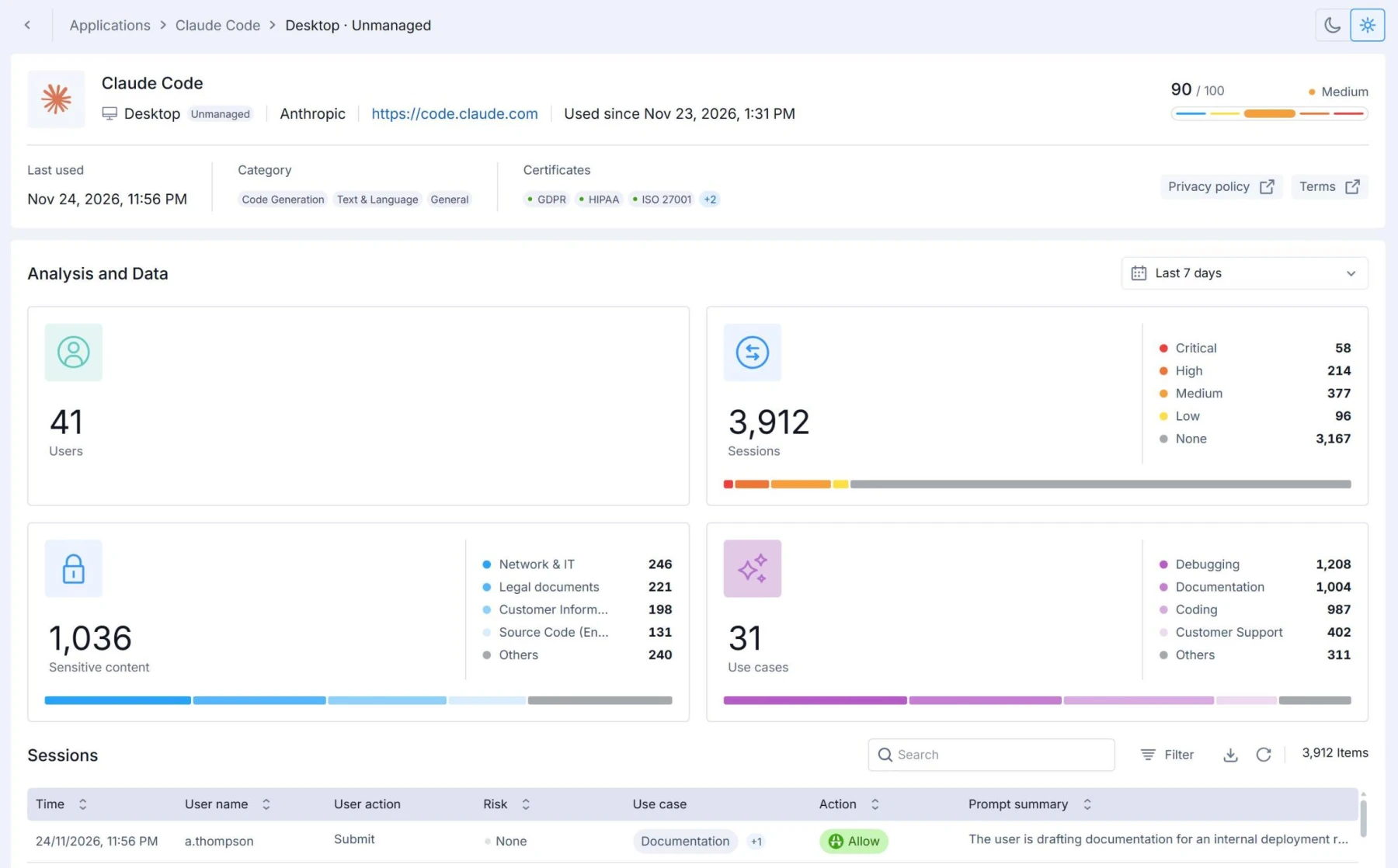
We do not start by blocking. The sensors go onto your work devices and watch for a few weeks, so the first conversation is about what your people really use: which apps, how often, for what kind of work, and how much sensitive content went into each. Every rule after that is measured against the baseline.
The rules
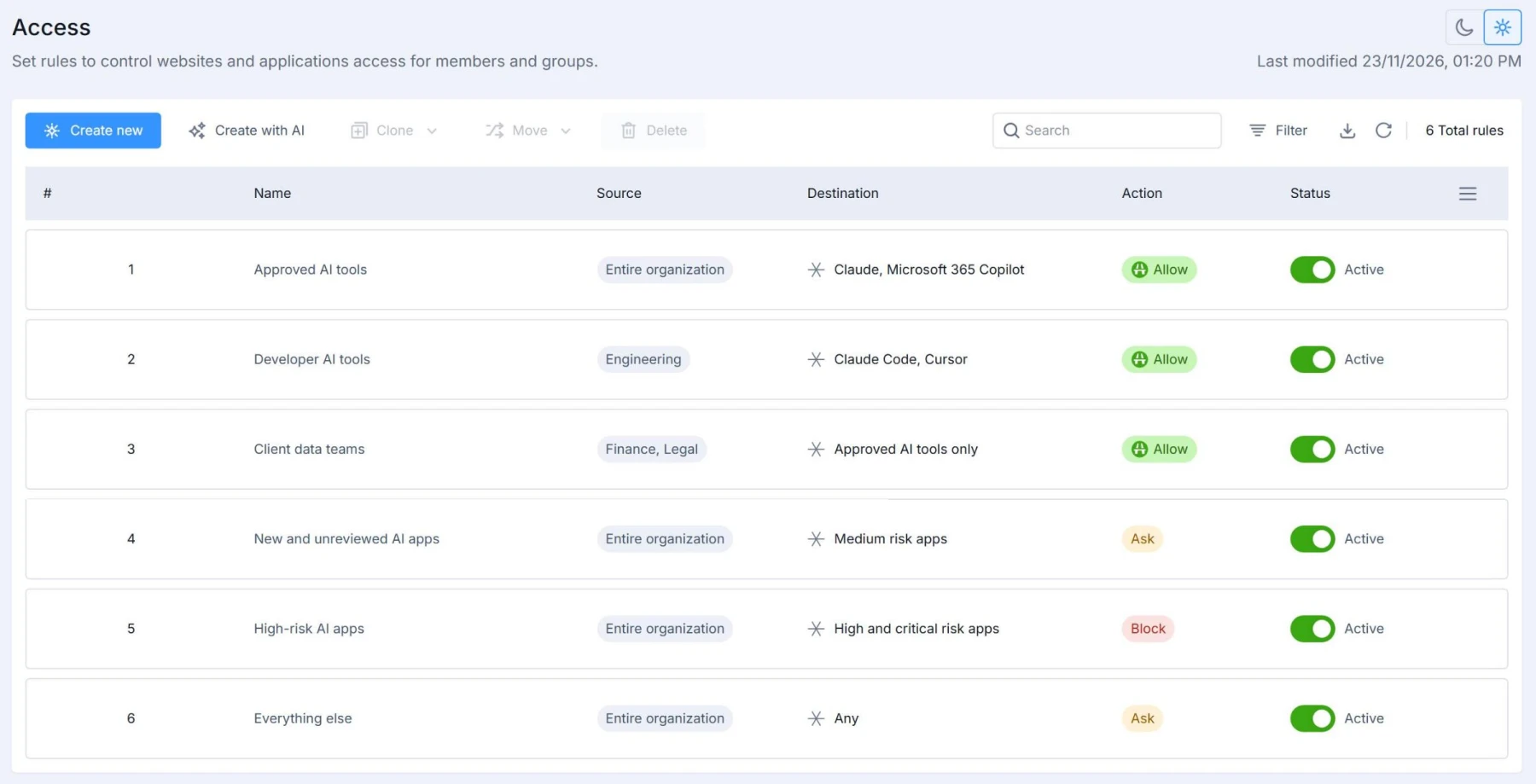
Each rule is a decision you make with us and we then enforce. These are the ones most clients start with.
01
Rules are set per person or group, taken from your directory. Engineering can have coding assistants. Finance and legal get a tighter list.
02
Staff get the AI tools you have approved. New and unreviewed apps prompt a question first, and high-risk apps are blocked.
03
On the main AI platforms, staff use the AI the business pays for, signed in with the work account. The same tool on a personal login is blocked or restricted, so company data stays under your contract.
04
Client records, credentials, source code and financial data are checked in every prompt, paste and upload, then allowed, redacted or stopped by rule.
05
The rules sit on the device, not the office network. They apply the same in the office, at home and on the road. Devices we do not manage are out of scope, and we tell you so.
06
Desktop AI apps, coding assistants and the tools AI agents can reach are covered, not only chat in the browser.
In practice
A typical starting set: approved tools for everyone, coding tools for the team that needs them, a question before anything new, and a block on high-risk apps. We write it, test it against the baseline, and change it when the business changes.
The difference
The common approach
The well-known sites are blocked and everything else gets through. Staff switch to a personal device, and use you could see becomes use you cannot.
What we do
Staff get the AI tools that are useful. An agent on each device applies the rules to the user and the data, all day, not to a list of websites that is out of date by next month.
The evidence
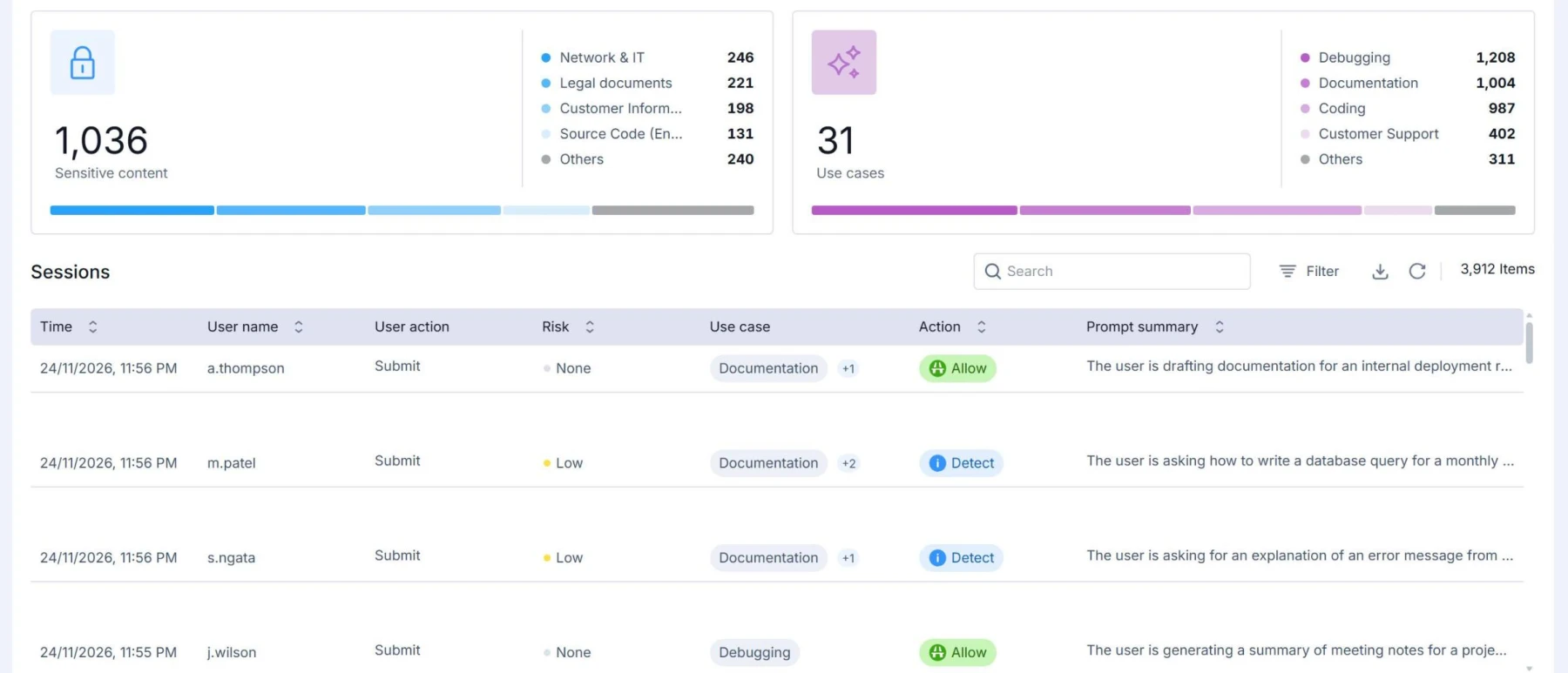
Every session is logged by the agent that enforced the rule, with the person, the app, what it was used for and whether sensitive content was involved. That record is what turns an AI use policy into something you can show a board, an insurer or an auditor.
The service
Always covered
AI apps in use
Every AI app on your work devices is found, counted by how many people use it, and given a risk rating.
New AI tools
Tools that appear for the first time are picked up as they are used and held for a decision.
Sensitive data
Prompts, pastes and uploads are checked as they are sent, then blocked, redacted or questioned by rule.
Blocked access
Attempts to reach AI apps that are not approved are stopped on the device and logged.
Agents and connectors
The agents and MCP tools found on devices are inventoried, and what they can reach is controlled.
Reporting and decisions
A regular report of what the agents did, with the short list of tools and rules that need a decision from you.
Compliance
The Privacy Act 2020 applies to personal information your staff put into an AI tool. An inventory, enforced rules and an event log are how you show the policy is being followed. Layer3 is certified to ISO/IEC 27001:2022 and runs the same disciplines internally.
This is a control, not a guarantee. It covers managed devices where the extension or agent is installed. A personal phone is outside it, which is why the written policy and staff training still matter. Prompts are analysed in the cloud, in a region chosen at setup; Australia is the nearest.
Before you ask
If yours is not here, ask it directly and you will get a straight answer.
Book a discovery callNext step
Thirty minutes with someone who can show you what discovery finds and what the rules would look like for your organisation.

Layer3 is a managed IT provider operating an ISO/IEC 27001-certified ISMS, with offices across New Zealand.
Contact
0508 LAYER3 Book a discovery call Service status Notices
Level 2, CBD Towers
84-90 Main Street
Upper Hutt, Wellington 5018
© 2026 Copyright Layer3.






Layer3
Book a discovery call - 30 minutes, no obligation